Showing posts with label oracle soa. Show all posts

Monday, January 16, 2017

XQuery - Parsing/syntax validation of a CSV file (number of columns and expected header)

Problem:

When polling/reading a file in CSV format and the file doesn't have the expected number of columns, there are three scenarios that can happen when trying to translate this file into an XML using the Translate to Native Format activity in BPEL:

1) More commas in one of the lines than the number of columns at the header level

With adding extra commas, there is no parsing error to be handled and the file is processed. However, it causes the element right after it to be null, and for the rest of the values to be phased off by one, causing the last element to contain two or more values.

For example, with one extra comma:


With two extra commas:


2) Less commas in one of the lines than the number of columns at the header level 

This gives the following error while reading the file:

Gives following error while polling:

Error while translating.
Translation exception.
Error occured while translating content from file /ftp_read/ftp_folder1/raw_data.csv
Please make sure that the file content conforms to the schema. Make necessary changes to the file content or the schema. 


3) The header (if required) is missing from the file or the column names in the header are in a different order than as expected in the schema.

Solution:

To prevent BPEL from mis-translating these files due to an error in generating these files (and handle these errors more gracefully), you can create an XQuery file that will validate that the header exists (according to a predefined NXSD schema) and check that the number of commas in all of the rows matches that of the header (first row). This has to be done in XQuery since Oracle's XSLT 2.0 implementation doesn't support the replace and tokenize functions used here.

To check that the header exists:

declare function local:header_in_file($sourceInput as element() (:: schema-element(ns1:validationXMLRequest) ::), 
                                      $fileHeader as xs:string) {
     let $header:=$fileHeader
    (: remove anything that isn't a comma or letters/numbers :)
    let $expectedHeader:=replace($header,'[^,A-Za-z0-9]','')
    (: remove the last comma that was added from the transformation earlier :)
    let $expectedHeader:=substring($expectedHeader,1,string-length($expectedHeader) - 1)
    (: get the raw data :)
    let $data:=tokenize(fn:data($sourceInput/ns1:PayLoad), '\n\r?')
    (: obtain the first line from the incoming file, which is supposed to be the header :)
    let $headerInFile:= $data[1]
    (: remove anything that isn't a comma or letters/numbers :)
    let $headerInFile:=replace($headerInFile,'[^,A-Za-z0-9]','')
    let $result:=compare($headerInFile, $expectedHeader)
    where $result !=0
    return 
     <Error>The header in the file does not match the expected header.</Error>
};

To check that the number of commas matches in all the rows:

declare function local:func($sourceInput as element() (:: schema-element(ns1:validationXMLRequest) ::)) as element()* (:: schema-element(ns2:validationReport) ::) {
   
        let $rawdata:=fn:data($sourceInput/ns1:PayLoad)
        (: remove everything except commas, quotations (eg. "LastName, FirstName"), and newline:)
         let $replace:=replace($rawdata,'[^,&quot;\n\r]','')
         (:  remove instances of commas inside quotation marks (e.g. "LastName,FirstName") :)
         let $commasOnly:=replace($replace,'&quot;[,]*&quot;','')
         let $tokenized:=tokenize($commasOnly, '\n\r?')
         let $header:=$tokenized[1]
         let $total:=count($tokenized)
         
         for $row at $pos in $tokenized
         let $rowCommas:=string-length($row)
         let $headerCommas:=string-length($header)
         let $result:=compare($header,$row)
         (:skipping the header and the last array which is an empty line :)
         where $pos != 1 and $pos!= $total and $result != 0
         return 
            <Error>
                    {concat('Row #',$pos, ' does not have the same number of commas as defined in the header. Header commas: ',$headerCommas, ' Row commas: ',$rowCommas)}
            <Error>
};

But how can you dynamically know the header of the file? Simple: using the NXSD schema, you populate a dummy variable based on the NXSD element:


You then manually transform using the following XSLT to a string variable (in this case, $header):

<?xml version="1.0" encoding="windows-1252" ?>
<xsl:stylesheet version="2.0" xmlns:xsl="http://www.w3.org/1999/XSL/Transform"
                xmlns:tns="http://www.test.com/soa/nxsdschema">
  <xsl:output method="text"/>
    <xsl:template match="/">
    <!-- replace the select elements with the corresponding elements in NXSD schema -->
           <xsl:for-each select="//tns:ProbeCompletionDetails/tns:ProbeCompletionDetail/*"> 
        <xsl:value-of select="local-name()"/>,
    </xsl:for-each>
  </xsl:template>  
</xsl:stylesheet>

This outputs in text form the elements of the NXSD schema (which are based on the header) separated by a comma.

And then do an assign activity like the following so that it gets the result as a string:
<assign name="Transform">
<copy><from>ora:processXSLT('Transformations/TransformGetHeader.xsl',$dummyVariable)</from>
        <to>$header</to>
      </copy>
    </assign>

Note: The assign activity HAS to be done using this function and not any other variation (e.g. doXSLTransformForDoc etc.) since otherwise the text output from the XSLT will NOT be properly handled! Also in 12c, with the new folder structure, it is NOT necessary to add the two periods to access the Transformations folder (e.g. ../Transformations/TransformationFile.xsl). Doing so will cause for the XSLT file to not be recognized.

This $header variable is the one that is passed as an argument to the header_in_file function.

And...you're done! You've successfully [dynamically] validated your CSV file before translating it to XML, thus preventing ugly errors/mistranslations from occurring.

Wednesday, December 14, 2016

OSB - Using DVM in 12c using qualifiers

To use a DVM in OSB 12c which requires qualifiers, specify the function as such:

dvm:lookupValue(dvm-location, src-column, src-value, target-column, default-value, qualifiers[])


dvm:lookupValue('DVMQualifiers/Proxy/dvm-cities', 'CityCode', 'KN', 'CityName', 'NA', ('Country','USA'))

Monday, August 8, 2016

SOA - Unable to edit file/jms/db adapter; shows red cross mark

Problem:
Migrated composites to the 12c version are unable to be edited, even with the <?binding.jca dbAdapter_db.jca> fix. The adapter is also showing a red cross mark.

Solution:
The solution is provided in this Oracle community post:

Open .jca file for JMS adapter  and change from  adapter="JMS Adapter" to adapter="jms" . If you use database adapter as well , then change from adapter="Database Adapter" to adapter="db". (  ... adapter="File Adapter" to adapter="file")

The adapter is now able to be edited normally.

Wednesday, July 27, 2016

FYI - JMS Polling and Error Queues

FYI:

When polling a JMS queue in OSB, in order for it to go to the configured error queue, an error must be raised. Raising an error and then handling this error won't cause the message to be sent to the error queue. If the error is handled, then a fault must be raised again.

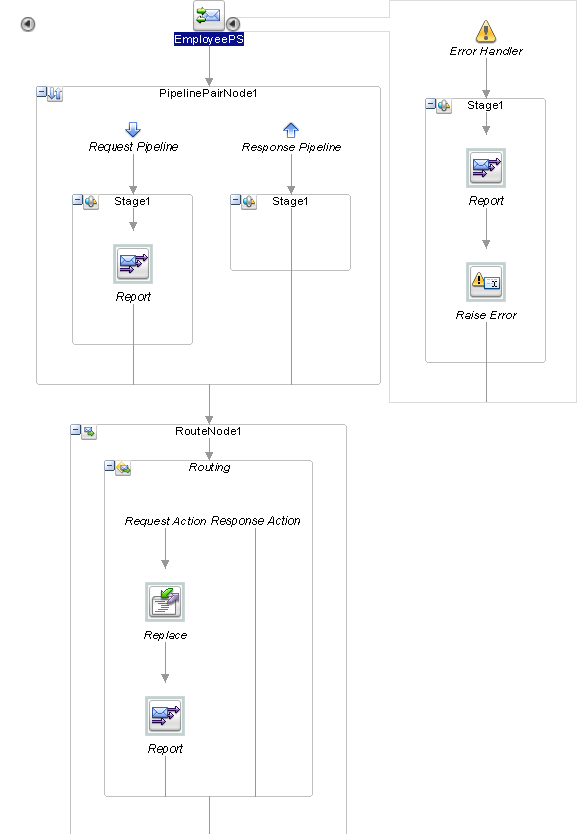
Take this simple proxy service as an example that polls from a JMS queue configured in weblogic and calls a stored procedure to insert the polled record:


EmployeePS Pipeline:


Should an unexpected error occur somewhere in this pipeline, it will be caught by the error handler. The error will be reported in the EM Message Reports but the error is raised again so that it can be sent to the error queue.

Doing a Reply with Failure will NOT send the message to the error queue. As explained by AbhishekJ here:

In case of JMS transport the JMS Queue or Topic will receive a NACK back but the message will NOT roll back and will be removed from the destination just like in case of Reply with Success. This happens because using a Reply action is considered as an exception being handled properly and a commit will be sent back to the JMS destination. To roll back the message ensure that you use Raise Error instead of a Reply action.

Tuesday, December 8, 2015

BPEL - FTP Adapter writes XML file without prefix in the root element

Problem:

When writing a file using the FTP adapter with the message schema defined, for some reason the output would come out without a prefix in the root element, like so:


This would happen even with the XSL transformation declaring the prefix in the root element:


I'm not sure if it's a bug or the fact that we have our schema/transformation wrong, but a coworker and I just couldn't get it to work, so we opted for a workaround using Java embedding.

Solution:

We used the following code to add the prefix to the root element by transforming the XML into a string:


 try{   
   oracle.xml.parser.v2.XMLElement responseFile = (oracle.xml.parser.v2.XMLElement)getVariableData("varResponseFile");   
   //setting prefix to root   
   oracle.xml.parser.v2.XMLNode firstChild = (oracle.xml.parser.v2.XMLNode)responseFile.getFirstChild();   
   responseFile.setPrefix(firstChild.getPrefix());   
   //getting xml document   
   oracle.xml.parser.v2.XMLDocument responseFileXML = (oracle.xml.parser.v2.XMLDocument)responseFile.getDocument();   
   //setting prologue   
   responseFileXML.setVersion("1.0");   
   responseFileXML.setEncoding("UTF-8");   
   //writing xml document   
   java.io.ByteArrayOutputStream outputStream = new java.io.ByteArrayOutputStream();   
   responseFileXML.print(outputStream );   
   String responseFileString = outputStream.toString();   
   //encode xml document   
   oracle.soa.common.util.Base64Encoder encoder = new oracle.soa.common.util.Base64Encoder();   
   String stringEnconded = null;   
   stringEnconded = encoder.encode(responseFileString);   
   //setting xml encoded   
   setVariableData("encodedBody",stringEnconded);   
 } catch (Exception e) {   
   addAuditTrailEntry("Error encoding Response File: " + e.getMessage());   
   throw new RuntimeException(e);   
 }  

We would of course change the FTP message schema to opaque instead. Applying this code would then write the XML file correctly:


If anyone knows how to do this without Java (or perhaps what we are doing wrong in the first place), please let us know in the comments!

Tuesday, September 29, 2015

DbAdapter - RowSet Column Type Mismatch Error

Problem: 
Invoking an SQL Server stored procedure with the Db Adapter would return the following error:

JCA Binding execute of Reference operation 'dbGetPromotions' failed due to: RowSet Column Type Mismatch Error. The SQL type in the XSD (INT) does not match the SQL type in the RowSet (int identity) for column ReservationID of parameter RowSet0.

This would happen when the DB Adapter would try to return the Output Parameters for the dbGetPromotions operation.

Solution:
Fix the XSD that was generated during the DB Adapter Wizard.

Originally, the XSD had been generated like this:

  <element name="ReservationID" type="int" db:type="INT" minOccurs="0" nillable="true"/>  

However, apparently the db:type needed for the element ReservationID needed to be int identity, so I changed it as follows:

 <element name="ReservationID" type="int" db:type="INT IDENTITY" minOccurs="0" nillable="true"/>  

Usually the same error will tell you what you need to change the db:type to, so just change it accordingly and you're ready to go!

BPEL - Append multiple elements to a list

Problem: I had a list of XML elements like so:
<Messages> <Message Area="RES" Code="Code1"/> <Message Area="RES" Code="Code2"/> <Message Area="RES" Code="Code3"/> </Message>

This is the XSD:


<xsd:schema xmlns:xsd="http://www.w3.org/2001/XMLSchema" xmlns="http://danytests.com/soa/bpel-append" targetNamespace="http://danytests.com/soa/bpel-append" elementFormDefault="qualified"> <xsd:element name="Messages" type="MessagesType"> <xsd:annotation> <xsd:documentation>A sample element</xsd:documentation> </xsd:annotation> </xsd:element> <xsd:complexType name="MessagesType"> <xsd:sequence> <xsd:element name="Message" maxOccurs="unbounded"> <xsd:complexType> <xsd:attribute name="Area" type="xsd:string"/> <xsd:attribute name="Code" type="xsd:string"/> </xsd:complexType> </xsd:element> </xsd:sequence> </xsd:complexType> </xsd:schema>
What I needed to do was append more items to the already existing list without affecting the ones that were already in there.

At first what I was doing was adding the new items to add to a BPEL variable ($varMessages) that was also of MessagesType. Then, with another variable ($messageCount), I would assign the count of Messages/Message PLUS 1 to it (so, in this case, it would be 4). In a foreach loop, starting with $messageCount, I would do a simple Copy to Messages/Message[$messageCount] and setting the insertMissingToData flag. This, however, isn't really the right way to go about this.

Solution: Use the BPEL Append action instead of the Copy action.

To accomplish this, I would still have the $varMessages variable assigned with the new items to add, but instead my BPEL assign activity would look like this:


<assign name="appendMessages"> <extensionAssignOperation> <bpelx:append> <bpelx:from>$varMessages/ns1:Message</bpelx:from> <bpelx:to>$outputVariable.payload</bpelx:to> </bpelx:append> </extensionAssignOperation> </assign>

That is, I'd assign the Messages from $varMessages to the final list ($outputVariable) in the Messages complexType.

The results were as expected while looking at it in the audit trail. First I'd assign a Message element to the $outputVariable:


Then I'd add elements to $varMessages:


Finally, after the append action, the output variable's final list would look like this:


Neat!

Monday, April 27, 2015

WS Security - Calling a secured Web Service with nonce from BPEL

Problem:

We had to call a secured web service that required a username token to be sent in the SOAP header, but being a WS Security newbie, I bumped into a lot of issues trying to get it to work. After adding the certificate into the SOA Server trust store, I was getting the following error after applying the oracle/wss_username_token_policy:

oracle.j2ee.ws.client.jaxws.JRFSOAPFaultException: Client received SOAP Fault from server : Exception thrown while trying to deserialize the SOAP message
at oracle.j2ee.ws.client.jaxws.DispatchImpl.throwJAXWSSoapFaultException(DispatchImpl.java:1053)
at oracle.j2ee.ws.client.jaxws.DispatchImpl.invoke(DispatchImpl.java:839)
at oracle.j2ee.ws.client.jaxws.OracleDispatchImpl.synchronousInvocationWithRetry(OracleDispatchImpl.java:235)
at oracle.j2ee.ws.client.jaxws.OracleDispatchImpl.invoke(OracleDispatchImpl.java:106)

After reading this very useful post from the AMIS Technology blog, I was able to attach the WS Security header right into the SOAP message which included the Nonce section, like so:

<wsse:Security xmlns:wsse="http://docs.oasis-open.org/wss/2004/01/oasis-200401-wss-wssecurity-secext-1.0.xsd" xmlns:wsu="http://docs.oasis-open.org/wss/2004/01/oasis-200401-wss-wssecurity-utility-1.0.xsd">
   <wsse:UsernameToken xmlns:wsu="http://docs.oasis-open.org/wss/2004/01/oasis-200401-wss-wssecurity-utility-1.0.xsd">
      <wsse:Username>username</wsse:Username>
      <wsse:Password Type="http://docs.oasis-open.org/wss/2004/01/oasis-200401-wss-username-token-profile-1.0#PasswordText">password</wsse:Password>
      <wsse:Nonce>Gt0q/QzAnQn/KMzhXYgR8Q==</wsse:Nonce>
   </wsse:UsernameToken>
</wsse:Security>

The call to the web service would now complete successfully since the original policy does not include the nonce, but this isn't the best way to do it since it's hardcoded into the BPEL process and it's just not very dynamic. The other, better way to do it is by using the OWSM policies and the credential store. I won't go too much into detail on how to setup the keystore and the credential store (I will do a follow-up post on this later on), but I will explain how I managed to send a nonce in the header using the policies, which...isn't really that hard at all!

Solution:

1) Go to the Oracle Enterprise Manager.

2) Under the farm name, expand the Weblogic Domain folder and right-click on the name of your domain, then select WebServices -> Policies.


3) Filter the policies by Service Clients and scroll down until you find one called oracle/wss_username_token_policy. This is the policy I attached on the webservice I had to call, but by default, this policy does NOT include the Nonce. Select it and click at the top "Create Like". I created a copy of this policy so I wouldn't mess with the original.

4) Give your policy a name (I named mine oracle/wss_username_token_nonce_policy) and then scroll down to the area that says "Assertions", Under the Settings tab, click "Show Advanced Fields":

5) Check the box that says "Nonce Required" and save your new policy. My web service only required the nonce, but if yours also needs a creation time, then go ahead and click that, too.


6) Now go to your composite, and below the composite name click SOA Composite -> Service/Reference Properties -> Web Service that you are calling


7) Here, click the Policies tab, then under Directly Attached Policies, click Attach/Detach.


8) Look for your new policy, click Attach, then OK.

9) Your policy should now appear under Directly Attached Policies. If you click on it, its information will be displayed under Security Configuration Details, including the csf-key. These are the credentials that the web service sends for the Username and Password. They can be configured in the Credential Store. In my case, since I had configured the basic.credentials with the username and password that the web service required, there was no need to override this value so the Current Value is left as blank.


When I tried the Web Service again, the policy did the same job as manually adding the SOAP header and the composite completed successfully! :)

Wednesday, April 8, 2015

XSLT - carriage return not working for text output

Problem:

When deploying an XSLT, the carriage return or line feed for text output would not show up when looking at the style sheet in the MDS repository. This was how I was trying to do the carriage returns:

<xsl:text>&#xd;</xsl:text>
<!-- OR -->
<xsl:variable name='newline'><xsl:text>
</xsl:text></xsl:variable> 

But when I would look at the XSLT in the MDS Repository, it would ignore the line breaks and just close the <xsl:text/> tags:

<xsl:text/>
<xsl:variable name="newline">
<xsl:text/>
</xsl:variable> 

Solution:

I ended up having to do it with a variable like so:

<xsl:variable name="newline" select="'&#xD;&#xA;'" /> 

This would show up correctly in the MDS repository and the text output would give the expected result.

Monday, April 6, 2015

XSLT - transforming to text output and writing to File Adapter

Problem:

I have an XSLT which is supposed to transform an XML (polled by a File adapter) to a plain text file. I tried the transformation in several online XSLT test tools (such as xslttest.appspot.com) and the output is shown as expected, so I was inclined to believe that there was nothing wrong with how I was doing the transformation. I used the mediator to do the transformation and passed it to a File Adapter to write the result in a .txt file.

I had another XSLT which transforms to an HTML file via a Mediator and that one worked as it should, but when I would replace the transformation file with an output method of text, the Mediator wouldn't do the transformation and so the File Adapter would give me the following error:

"JCA Binding execute of Reference operation 'Write' failed due to: Input Source null. Input Source null. Input Source is null. Please make sure that the outbound interaction receives a valid payload. ".

I wasn't sure why the XSLT wasn't working for a text output while the HTML output seemed to work fine with the Mediator.

Solution:

What I eventually had to do was pass the payload to BPEL and do the transformation using the ora:processXSLT function in an Assign activity:

ora:processXSLT('xsl/850-to-POI.xsl',$ReceiveFile_Read_InputVariable.body)

Note: The assign activity HAS to be done using this function and not any other variation (e.g. doXSLTransformForDoc etc.) since otherwise the text output from the XSLT will NOT be properly handled! Also in 12c, with the new folder structure, it is NOT necessary to add the two periods to access the Transformations folder (e.g. ../Transformations/TransformationFile.xsl). Doing so will cause for the XSLT file to not be recognized.

I copied this result to a String variable called "decodedBody", then I used Java to encode the contents to a base64binary variable called "encodedBody" (I tweaked a bit the very useful encoding function found in this blog):

addAuditTrailEntry("Base64encode started");       
    
try     
{       
String input = (String) getVariableData("decodedBody");       
addAuditTrailEntry("Base64decode decoded="+input); 

oracle.soa.common.util.Base64Encoder encoder = new oracle.soa.common.util.Base64Encoder();   
String encoded = encoder.encode(input);       
      
setVariableData("encodedBody",encoded);    
}    
     
catch (Exception e)     
{       
  addAuditTrailEntry("Base64encode Exception: "+e.getMessage());       
}       
    
addAuditTrailEntry("Base64encode ended");

I would then pass the encodedBody to the File Adapter input variable (which had an opaque schema). This would write the positional flat file I needed to a plain .txt. :)

I'm not sure if there is a better way to do this by just using the Mediator, so if anyone has any tips please do let me know in the comments!

Thursday, March 5, 2015

Business Rules - java.lang.ArrayIndexOutOfBoundsException: -1

Having a composite which uses Business Rules would out of nowhere stop completing properly and just start giving the following errors in the payload:

<bpelFault>
<faultType>0</faultType>
<operationErroredFault>
<part  name="payload">
<errorInfo>
<errorMessage>-1</errorMessage>
</errorInfo>
</part>
</operationErroredFault>
</bpelFault>

The logs would be equally unhelpful:
[2015-03-04T18:32:41.703-06:00] [soa_server1] [ERROR] [] [oracle.soa.services.rules] [tid: Workmanager: , Version: 0, Scheduled=false, Started=false, Wait time: 0 ms\n] [userId: <anonymous>] [ecid: 11d1def534ea1be0:-15391dae:14aac95ef8b:-8000-00000000019021ae,0] [APP: soa-infra] [composite_instance_id: 1983847] [component_instance_id: b39ee544-7266-43b3-b180-3c107ca2f0ad] [composite_name: Dynamic_DirectoryFTP!3.5] [component_name: DynamicDirectoryRules] <.> Error creating the decision document.[[
Error while trying to create the decision document for DynamicDirectoryRules_DecisionService.
Check the underlying exception and correct the error. If the error persists, contact Oracle Support Services.
 Error creating the decision document.
Error while trying to create the decision document for DynamicDirectoryRules_DecisionService.

Check the underlying exception and correct the error. If the error persists, contact Oracle Support Services.   at oracle.bpel.services.rules.impl.DocumentHandler.createElementFromDecision(DocumentHandler.java:417)
    at oracle.bpel.services.rules.fabric.BusinessRulesServiceEngine.createNormalizedMessage(BusinessRulesServiceEngine.java:2747)
    at oracle.bpel.services.rules.fabric.BusinessRulesServiceEngine.request(BusinessRulesServiceEngine.java:1057)
    at oracle.integration.platform.blocks.mesh.SynchronousMessageHandler.doRequest(SynchronousMessageHandler.java:139)
    at oracle.integration.platform.blocks.mesh.MessageRouter.request(MessageRouter.java:182)
    at oracle.integration.platform.blocks.mesh.MeshImpl.request(MeshImpl.java:190)
    at sun.reflect.GeneratedMethodAccessor1925.invoke(Unknown Source)
[.......]
Caused by: java.lang.ArrayIndexOutOfBoundsException: -1
    at com.sun.xml.bind.v2.util.CollisionCheckStack.pushNocheck(CollisionCheckStack.java:132)
    at com.sun.xml.bind.v2.runtime.XMLSerializer.childAsRoot(XMLSerializer.java:491)
    at com.sun.xml.bind.v2.runtime.MarshallerImpl.write(MarshallerImpl.java:320)
    at com.sun.xml.bind.v2.runtime.MarshallerImpl.marshal(MarshallerImpl.java:250)


After trying everything, from starting the composite application from scratch, to undeploying and re-deploying the application, to re-creating only the ruleset, and restarting servers, we eventually found out that there was a patch available for this error:


RELEASE NOTES:
]]   In 11.1.1.6 Rules engine randomly throws 'java.lang.ArrayIndexOutOfBoundsE
]]xception:-1" environment when running a composite application using business 
]]rules.
REDISCOVERY INFORMATION:
  If Rules Engine throws 'java.lang.ArrayIndexOutOfBoundsException:-1' from the
 jaxb marshaller code you might be encountering this bug. 


Applies to:

Oracle(R) BPEL Process Manager - Version 11.1.1.6.0 to 11.1.1.7.0 [Release 11gR1]
Oracle SOA Suite - Version 11.1.1.6.0 to 11.1.1.7.0 [Release 11gR1]
Information in this document applies to any platform.

-----------------------

To apply the patch, we followed these steps:

  1. Went to My Oracle Support and downloaded the patch. The patch includes two folders for different products, we used the "oui" folder for Oracle Business Process Management Suite.
  2. Set the ORACLE_HOME environment variable:
           $ ORACLE_HOME=/u01/local/oracle/Middleware/Oracle_SOA1
  3. Ran the opatch lsinventory to make sure it completed successfully:

          [oracle@ Oracle_SOA1]$ OPatch/opatch lsinventory
    Oracle Interim Patch Installer version 11.1.0.9.9
    Copyright (c) 2012, Oracle Corporation.  All rights reserved.
    Oracle Home       : /u01/local/oracle/Middleware/Oracle_SOA1
    Central Inventory : /u01/local/oracle/oraInventory
       from           : /u01/local/oracle/Middleware/Oracle_SOA1/oraInst.loc
    OPatch version    : 11.1.0.9.9
    OUI version       : 11.1.0.9.0
    Log file location : /u01/local/oracle/Middleware/Oracle_SOA1/cfgtoollogs/opatch/opatch2015-03-05_14-03-08PM_1.log
    OPatch detects the Middleware Home as "/u01/local/oracle/Middleware"
    Lsinventory Output file location : /u01/local/oracle/Middleware/Oracle_SOA1/cfgtoollogs/opatch/lsinv/lsinventory2015-03-05_14-03-08PM.txt
    --------------------------------------------------------------------------------
    Installed Top-level Products (1):
    Oracle SOA Suite 11g      11.1.1.7.0
    There are 1 products installed in this Oracle Home.
    There are no Interim patches installed in this Oracle Home.
    ------------------------------------------------------------------------------
    OPatch succeeded.

  4. Made sure "unzip" and "opatch" were part of my PATH environment variable:

    [oracle@srgismty1-0499 Oracle_SOA1]$ which unzip
    /usr/bin/unzip
    [oracle@srgismty1-0499 Oracle_SOA1]$ which opatch
    /usr/bin/which: no opatch in (/usr/lib64/qt-3.3/bin:/usr/local/bin:/bin:/usr/bin:/usr/local/sbin:/usr/sbin:/sbin:/home/oracle/bin)
    [oracle@srgismty1-0499 Oracle_SOA1]$ PATH=$PATH:/u01/local/oracle/Middleware/Oracle_SOA1/OPatch
    [oracle@srgismty1-0499 Oracle_SOA1]$ which opatch
    /u01/local/oracle/Middleware/Oracle_SOA1/OPatch/opatch
  5. Unzipped the patch: $ unzip p14272172_111170_Generic.zip
  6. Went to the directory where the patch is located: $ cd 14272172/oui/
  7. Applied the patch:

    [oracle@server oui]$ $ORACLE_HOME/OPatch/opatch apply


    Oracle Interim Patch Installer version 11.1.0.9.9
    Copyright (c) 2012, Oracle Corporation.  All rights reserved.


    Oracle Home       : /u01/local/oracle/Middleware/Oracle_SOA1
    Central Inventory : /u01/local/oracle/oraInventory
       from           : /u01/local/oracle/Middleware/Oracle_SOA1/oraInst.loc
    OPatch version    : 11.1.0.9.9
    OUI version       : 11.1.0.9.0
    Log file location : /u01/local/oracle/Middleware/Oracle_SOA1/cfgtoollogs/opatch/14272172_Mar_05_2015_14_15_29/apply2015-03-05_14-15-28PM_1.log


    OPatch detects the Middleware Home as "/u01/local/oracle/Middleware"

    Applying interim patch '14272172' to OH '/u01/local/oracle/Middleware/Oracle_SOA1'
    Verifying environment and performing prerequisite checks...
    All checks passed.

    Please shutdown Oracle instances running out of this ORACLE_HOME on the local system.
    (Oracle Home = '/u01/local/oracle/Middleware/Oracle_SOA1')


    Is the local system ready for patching? [y|n]
    y

    User Responded with: Y
    Backing up files...

    Patching component oracle.integration.soainfra, 11.1.1.7.0...

    Verifying the update...
    Patch 14272172 successfully applied
    Log file location: /u01/local/oracle/Middleware/Oracle_SOA1/cfgtoollogs/opatch/14272172_Mar_05_2015_14_15_29/apply2015-03-05_14-15-28PM_1.log

    OPatch succeeded.
  8. Restarted managed and admin servers and the composite was now completing successfully! :)